Redirect: What Is It And How Does It Work?
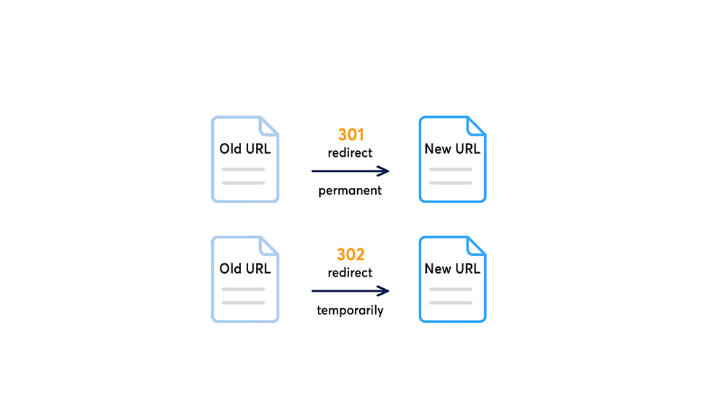
A redirect is a technical instruction that automatically redirects a visitor from one URL to another. Websites grow and change: pages are moved, URLs are adjusted and content is given a new place. With the right referral, you ensure that visitors always end up on the right page, and that Google maintains your positions. Do you want to know how to go about it? Read on to find out everything you need to know about redirects.
Table of Content
What is a redirect?
A redirect automatically redirects search engines (and also visitors) to another URL, without them having to do anything. The browser receives a signal: “this page is now somewhere else.” The visitor sees the new page, without noticing that anything has changed.
This is pleasant for visitors. But it is also a signal to search engines. Google uses this signal to understand whether a page has been moved permanently or temporarily. The way you set up a redirect therefore partly determines what happens to your SEO value.




When and why do you use a redirect?
Redirects are necessary in situations where a URL changes or disappears. That sounds simple, but the impact is huge. Google has indexed pages to their original URLs. If that URL disappears without a redirect, you lose the built-up authority of that page.
Common situations where you need redirects:
- You are launching a new website with a different URL structure
- You delete a product or category page that is still attracting traffic
- You merge two pages into one
- Your domain is moving to a new name
- You switch from HTTP to HTTPS
In all these cases, the right referral protects both the user experience and your search results.
What types are there?
There are multiple types of redirects, but for SEO, there are two that you really need to know. Both redirect visitors to a different URL, but they communicate a different signal to search engines.
Redirect 301: Final Change
A redirect 301 is used when a page has been moved permanently. This is the most commonly used variant for SEO purposes. With a 301, Google understands that the old URL will not come back and transfers most of the accumulated link value to the new URL.
Always use a 301 with:
- A new domain migration
- Permanently deleted pages
- Structural adjustments to your URLs
- Switching from HTTP to HTTPS
An incorrectly set 301 can cost link value, so accuracy is important here.
Redirect 302: Temporary change
You use a redirect 302 when a page is temporarily unavailable. Google will keep the original URL in the index and won’t transfer the link value to the new location. That is exactly the intention in a temporary situation.
Use a 302 with:
- A Page that temporarily links an action during a campaign
- A/B testing where you temporarily redirect traffic to another page
- Maintenance pages that are active for a short period of time
Note: Never use a 302 for permanent changes. That’s a common mistake that hurts your SEO.
How do you create a redirect?
You can set up a redirect at the server level or via your CMS. The method depends on the technical setup of your website. The most direct way is via the .htaccess file on an Apache server. For WordPress, there are plugins available that simplify the process, such as Yoast SEO or Redirection.
The basic rule for a 301 in .htaccess looks like this:
Redirect 301 /old-page/ https://www.domein.com/digital-marketing/
Are you using another platform like Shopify or Magento? Then those platforms offer their own interface for managing redirects. Are you dealing with a large migration or complex structure? Then it is wise to have this carried out by a specialist. Mistakes in the referral are easily made and the consequences for your findability can be significant.
Common mistakes with redirects
When setting up redirects, things regularly go wrong. The most common mistakes cause loss of SEO value or a poor user experience, especially when the SEO migration takes place without a solid plan.
Redirect chains are created when you place multiple redirects in a row. Page A points to page B, page B to page C. Each step takes loading time and SEO value. Solve this by always referring directly from A to C.
Redirect loops are even more problematic. Page A refers to page B, page B refers back to page A. The visitor never arrives anywhere, and the page does not load.
Other common mistakes:
- Using a 302 where a 301 is meant to be
- Not updating internal links after a redirect
- Forgotten redirects after a website migration
- Don’t set up a redirect for the www and non-www variants of a domain
After every change, check your redirects with a tool like Screaming Frog or Aref’s. This prevents small errors from growing into structural problems.
Set up redirects? Outreachway takes care of it for you
Setting up a redirect correctly seems simple but requires technical insight and attention to detail. Especially with a website migration or major structural change, the risks pile up quickly. Outreachway takes over that work for you.
We combine technical SEO with a result-oriented approach. No long-term contracts, but maximum transparency about what we do and why. This way you know exactly what is going on and your website remains findable, even after major changes.
Get in touch and find out what Outreachway Digital Marketing team for your website can mean having a professional approach to each redirect.