Website SEO for Beginners: 5 Tips to Improve Your Website Visibility

Website SEO for beginners. Your website is online, but you get very few visitors. What now? How do you make sure your website gets the attention of your target group? And what should you do to keep visitors coming back? Search engine optimization (SEO) can help you with this. We give you five tips to improve your website visibility, plus a simple checklist to get started.
Table of Content
What is SEO?
Search engine optimization (SEO) is:
“A way to make your website rank higher in the search engine results”.



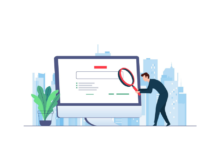
With the help of SEO, your website can appear more often and in higher positions in the search results, without paying for each click as you do with advertising.
When you type a search query into Google and press enter, Google searches its index, a huge database of web pages collected by its crawlers, for the most relevant and helpful answer to your question. To decide which pages to show first, Google looks at hundreds of signals: how well the content matches the search, how useful and trustworthy it is, how many quality links from other websites point to it, how fast and mobile-friendly the page is, and much more.
SEO also applies to other search engines, such as Bing, Yahoo and DuckDuckGo, and to platforms such as YouTube, which is owned by Google. When people talk about search engines, however, they usually mean Google’s search engine results page (SERP). Google is by far the most widely used search engine in the world, handling around 90% of all searches.

For the search shown above, Google reported over a million results. Only ten or so of them fit on the first page.
TIP: Click-through studies consistently show that the first few organic results on page 1 receive the large majority of clicks, and that very few people ever go to page 2. On top of that, ads, maps, images, videos and AI-generated overviews now take up space at the top of many results pages. That’s why it pays to aim for the first page, and ideally the top few positions, for the searches that matter most to your business.
SEO is not easy. It can take a lot of work to rank well for specific keywords. Worldwide competition, regular algorithm updates and hundreds of factors that influence the results make SEO a challenge. Still, it is absolutely worth continuing to improve your website step by step.
How search engines find and rank your website
Before your site can appear in search results, search engines need to be able to find and understand it. This happens in three steps:
- Crawling: search engine robots follow links to discover new and updated pages.
- Indexing: the content of those pages is analyzed and stored in the search engine’s index.
- Ranking: when someone searches, the search engine selects and orders the most relevant pages from its index.
If a page isn’t indexed, it can’t rank. You can check whether your site is indexed by searching for site:yourdomain.com on Google, or, better, by using Google Search Console, a free tool that shows how Google sees your website.
Website SEO beginners
How do you optimize your website for better search results?
Use the 5 tips below to improve your website visibility:
1. Create quality content
2. Find specific keywords in your industry
3. Fill in metadata
4. Bring structure to your text
5. Measure, analyze and monitor your website
1. Create quality content
First, create quality content for your website. The better your content, the easier SEO will be. Search engines try to show the most relevant and helpful content for every search. Google says it wants to reward content that is created for people, shows real experience and expertise, and leaves visitors satisfied.
Write unique text, don’t copy it from other websites. Use your own photos rather than stock images where possible. Add relevant infographics or videos. Answer the questions your customers actually ask, in more depth and more clearly than your competitors. Make your content for your visitors, not for search engines.
AI writing tools can help you brainstorm or create a first draft, but always add your own knowledge, examples and checks. Generic text that says the same as hundreds of other pages is unlikely to stand out.
2. Find specific keywords in your industry
Second, speak your customer’s language. Write content around specific keywords: the words and phrases your target group types into Google. This way, people can find you when they search for what you offer.
To find out which keywords people search for, you can use:
- Google Keyword Planner: a free tool in Google Ads that shows search volumes and related keywords. You can sign in with a Google account.
- Google Search Console: shows the searches for which your site already appears.
- Google’s own suggestions: the autocomplete suggestions, “People also ask” boxes and related searches at the bottom of the results page.
- Your customers: the questions you hear from customers every day are excellent keyword ideas.
For a new website, it is often smart to start with long-tail keywords: longer, more specific phrases such as “bakery with gluten-free bread in Amsterdam” instead of “bakery”. They have less search volume but also less competition, and the people searching for them usually know exactly what they want.
3. Fill in metadata
Third, don’t forget to optimize your metadata. The title tag and the meta description, a short summary of the page’s content, are the most important. Both often appear in the search results.
Don’t leave these fields blank. Otherwise, the search engine will fill in the information automatically, which isn’t always the best option. A clear, appealing title and description increase the chance that people click on your result. Google sometimes rewrites them, but a good title and description still help.
For each page:
Keep the title to about 50 to 60 characters, with the main keyword near the beginning. Keep the meta description to roughly 150 to 160 characters, and describe what the reader will get from the page. If you use WordPress, an SEO plugin makes it easy to fill in these fields for every page.
Don’t forget alt text for your images, either. A short description of what is in each image helps visually impaired visitors and helps search engines understand your images.
4. Bring structure to your text
Fourth, structure your text. Your readers will thank you for it. Well-structured articles are easier to read and easier for search engines to understand:
- Divide your text into short paragraphs of about 3 to 5 sentences.
- Use headings (H2, H3) to divide the text into clear sections.
- Use bullet points and numbered lists where it helps.
- Emphasize the most important information in bold.
- Link to other relevant pages on your own website.
- Don’t stuff your text with keywords. Use them naturally.
- Write short, clear and concrete sentences for your target audience, not for search engines.
5. Measure, analyze and monitor your website
Be aware that you won’t reach first place in Google in the short term. SEO is a long-term project: it often takes several months before new content and improvements have a clear effect. It’s important to measure, analyze and check your website regularly. Testing what works and what doesn’t, and making continuous small changes, will improve your rankings in the long run. SEO can also improve your website traffic and increase your online sales.
Google Analytics is a useful free tool for discovering how visitors use your website. Combined with Google Search Console, it shows you how to improve your website visibility, little by little:
- What actions do visitors take on your website?
- Which pages are the most popular with your target audience?
- Are there pages that hardly anyone views?
- For which searches does your site appear, and how often do people click?
- Which pages are close to page 1 and could rank higher with a little extra work?
Don’t forget technical SEO
Great content won’t help much if your website is slow or difficult for search engines to crawl. A few technical basics:
- Mobile-friendly: Google mainly uses the mobile version of your site for ranking, so make sure it works well on smartphones.
- Speed: compress images, use good hosting and limit heavy scripts. Google’s PageSpeed Insights shows what to improve.
- HTTPS: a secure connection is standard and builds trust.
- XML sitemap: submit it in Search Console so Google can find all your pages.
- No broken links: fix or redirect pages that no longer exist.
Local SEO for local businesses
Do you have a shop, office or service area? Then local SEO is especially important. Create and complete a free Google Business Profile with your address, opening hours, photos and services. Ask satisfied customers to leave a review, and make sure your name, address and phone number are the same everywhere online. This helps you appear in Google Maps and in the local results for searches such as “plumber near me”.
Getting links from other websites
Links from other reputable websites still count as a vote of confidence. The best way to earn them is to create content worth linking to, such as useful guides, original research or practical tools. You can also get listed in relevant industry directories, work with local partners and share your expertise as a guest on other sites. Avoid buying links in bulk or joining link schemes, which can harm your rankings.
Common SEO mistakes beginners make
- Targeting keywords that are too broad. A new website will struggle to rank for a single, highly competitive word. Start with more specific searches.
- Several pages competing for the same keyword. Give each page its own clear topic, so search engines know which one to show.
- Thin pages. Pages with only a few lines of text rarely rank well. Make sure every important page answers the visitor’s question properly.
- Forgetting to update content. Outdated information, prices or dates reduce trust. Review your key pages regularly.
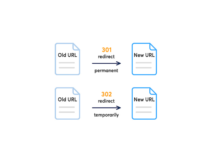
- Changing URLs without redirects. If you change a page’s address, redirect the old URL to the new one, or you lose visitors and rankings.
- Expecting quick results. Patience is part of SEO. Give your improvements time to take effect before judging them.
An SEO checklist for beginners
- Set up Google Search Console and Google Analytics.
- Make a list of 10 to 20 keywords your customers use.
- Give every important page a unique title and meta description.
- Write at least one helpful article that answers a common customer question.
- Check your site’s speed and mobile-friendliness.
- Add internal links between related pages.
- Review your results every month and keep improving.
Frequently asked questions about website SEO for beginners
How long does SEO take to work?
It usually takes several months before you see clear results, depending on competition, the age of your website and how much you invest in content and improvements.
Can I do SEO myself?
Yes. Many basics, such as writing good content, filling in metadata and setting up Search Console, are easy to learn. For competitive markets or technical issues, specialist help can speed things up.
What is the difference between SEO and Google Ads?
SEO aims for free, organic positions and takes time. Google Ads gives you paid positions immediately, but you pay for every click.
What are long-tail keywords?
Long-tail keywords are longer, more specific search phrases. They have lower search volume but less competition and often attract visitors who know exactly what they want.
How long should a meta description be?
Aim for roughly 150 to 160 characters, so that it isn’t cut off in the search results, and describe clearly what the page offers.
Is Google Search Console free?
Yes. Google Search Console is a free tool that shows how your site performs in Google Search and helps you find and fix problems.
How often should I add new content to my website?
There’s no fixed rule. Regularly publishing helpful content, for example a few articles a month, works well for many small businesses, but quality matters more than quantity. Updating and improving existing pages counts too.