Google Business Profile (Google My Business): Get the Most Out of It!

Do you know anyone who has never used Google Maps? No? We thought so! People don’t just use Google Maps to find their way. Besides navigation, Google Maps also shows what’s available locally, which makes it an ideal place to search for services and businesses. And in the normal Google search results, you’ll often see a block of local results from Google Maps between the other results. For local businesses, this is one of the most valuable places to be seen.
The free tool that controls how your business appears there used to be called Google My Business. At the end of 2021, Google renamed it Google Business Profile, and you can now manage your profile directly from Google Search and Google Maps. In this blog, we share tips to set up and optimize your Google Business Profile, so you attract more visitors to your shop, office or webshop.
Table of Content
Why your Google Business Profile matters
When someone searches for “bakery near me”, “plumber in [city]” or simply the name of your business, Google often shows a business profile with your address, opening hours, phone number, photos, reviews and a link to your website. Many people decide which business to call or visit based on that profile alone, without ever clicking through to a website.

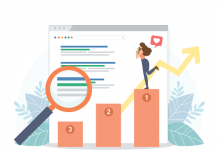

A complete, up-to-date profile helps you in three ways:
- Visibility: you appear more often in Google Maps and in the local results.
- Trust: photos, reviews and correct information convince people to choose you.
- Action: people can call, get directions, visit your website or book an appointment straight from the profile.
Getting started
If you don’t have a profile yet, go to Google Business Profile, sign in with a Google account and add your business. You’ll need to verify that you are the owner, for example via a phone call, text message, email or video recording, depending on what Google offers for your business. Check first whether a profile for your business already exists, as Google sometimes creates profiles automatically. In that case, you can claim it.
Fill in the basics carefully: business name (exactly as you use it in real life, without extra keywords), address or service area, phone number, website and opening hours. Make sure this information matches what’s on your website and other online listings.
1: List the right categories or services
To appear in relevant searches, you can add your business category and, where possible, your services or products to your profile. The options differ per industry: a physical shop can often add products, while a service provider can add services.
But first: your business category. This tells Google what industry you’re in and what you do or sell. For example, if a business is listed as a wine shop and someone searches for “buy wine” near that location, its profile may well appear in the results.
Choose one primary category that describes your core business as precisely as possible, and add a few secondary categories for other important activities. Even if your company only provides services, the right category helps you appear when someone searches for your field on Google.
You can also add products to your profile. This is very useful, because products can be shown in your profile, with a photo, price and description. It almost looks like a free advertisement!
Make sure the prices match those on your website. If you enter products manually, they aren’t automatically linked to your webshop, so remember to update your profile whenever a price changes. Retailers can also connect their product data via Google Merchant Center.
Whether you add products, services or both, keep the list up to date, with clear descriptions.
2: Add relevant attributes
To make your business stand out, you can add “attributes” to your profile. These are short facts that help customers choose, and the available attributes depend on your category. Examples include:
- Highlights
- Payment options
- Health and safety
- Planning and appointments
- Service options, such as delivery, takeaway or online appointments
- Accessibility, such as a wheelchair-accessible entrance
- Amenities, such as Wi-Fi or parking
Some of these attributes became more visible during COVID-19, when Google added options to show health and safety measures and service options such as curbside pickup. Today they remain a useful way to tell customers at a glance what to expect. Fill them in as completely as possible.
3: Post regular updates
Google Business Profile lets you publish posts, much like on social media. During the pandemic, Google also offered a special COVID-19 update type, but that has since been phased out. Regular posts remain a great way to keep your profile active and informative. You can share:
- Updates: news, tips or announcements.
- Offers: discounts or promotions with a start and end date.
- Events: workshops, open days or launches.
To create a post, search for your business name on Google or open Google Maps while logged in, open your profile and choose the option to add an update or post. Add a short text, an attractive photo and a button such as “Learn more” or “Call now”. Preview the post and publish it.
Posting regularly, for example once a week or a few times a month, shows customers your business is active and gives them a reason to choose you.
4: Add UTM Tags
Now that your profile is well on its way, you’ll naturally want to know what it delivers. To measure this, add UTM tags to the links in your profile.
By adding these UTM tags to your links, you can easily see in your analytics which visitors come from your Google Business Profile and what they do on your website. You can add the following UTM tag to your website link, for example: ‘?utm_source=google&utm_medium=organic&utm_campaign=gbp’.

In Google Analytics 4, you can then find these visitors in the Acquisition reports, such as Traffic acquisition, and see what they do on your site. Your profile itself also shows performance data: how many people viewed your profile, which searches they used, and how many called, asked for directions or clicked through to your website.
5: Add an appointment link
Does your business work by appointment? Then make sure you add an appointment or booking link. It can go to a booking page or to your contact page with a contact form. Some booking systems also integrate directly with Google, so customers can book without leaving Google. This way, potential customers can contact you straight from your listing in the search results or in Google Maps.
Also Read: Local SEO for Businesses to Rank in Multiple Cities?
6: Respond to reviews
Google lets people leave reviews on your profile. Make sure you respond to them, even the negative ones! It shows customers that you take feedback seriously. Of course, always stay friendly and polite: everyone can see your replies.
Got a positive review? Thank the customer for taking the time to share their experience. All these reviews help potential customers decide whether they want to do business with you. We therefore recommend asking satisfied customers to leave a review. You can create a short review link in your profile and share it by email, on receipts or via a QR code in your shop.
Never buy reviews or offer rewards in exchange for positive reviews. This breaks Google’s policies, and fake reviews can be removed or lead to restrictions on your profile.
More tips to strengthen your profile
Add high-quality photos and videos
Profiles with good photos tend to attract more clicks and direction requests. Add your logo, a cover photo, photos of your storefront (so people recognize it), the interior, your team and your products or work. Update them regularly, especially when something changes.
Write a strong business description
You have up to 750 characters to describe your business. Explain what you do, who you help and what makes you different. Mention your most important services and your location naturally, but don’t stuff it with keywords, links or promotions.
Keep opening hours up to date
Nothing is more frustrating for a customer than arriving at a closed door. Keep your regular hours current and add special hours for public holidays and other exceptions.
Keep an eye on new features
Google regularly adds, changes and removes Business Profile features. Chat messaging, for example, was discontinued in 2024. Check your profile every few months to see which options are available for your category and make use of them, so your profile stays as complete and useful as possible.
Protect your profile
Anyone can suggest edits to a business profile. Check your profile regularly to make sure no incorrect changes have been made. Use a business Google account that more than one trusted person can access, and add colleagues as managers rather than sharing a password.
How Google ranks local results
Google says three main factors determine how businesses rank in local results:
- Relevance: how well your profile matches what someone is searching for. Complete and detailed information, including the right categories, helps Google understand what you offer.
- Distance: how far your business is from the location of the searcher, or from the location mentioned in the search.
- Prominence: how well known your business is. This is based on information from across the web, such as links, articles and directories, as well as the number of reviews and your ratings. Your position in the regular search results also plays a role.
You can’t change your distance from a searcher, but you can improve relevance and prominence. A complete profile, a strong website, consistent business details across online directories, local press coverage and a steady flow of genuine reviews all contribute.
Service-area businesses
Do you visit customers at their location rather than receiving them at your own address, like a plumber, cleaner or mobile hairdresser? Then you can set up your profile as a service-area business. You indicate the cities, postcodes or regions you serve and hide your home or office address. This way you can still appear in local results without making your private address public. If you do receive customers at your address during opening hours, you can show both your address and your service area.
Common mistakes to avoid
- Adding keywords or city names to your business name. This breaks Google’s guidelines and can get your profile suspended.
- Using a virtual office or PO box as your address if you don’t actually serve customers there.
- Different contact details on your profile, website and other directories.
- Ignoring reviews, especially negative ones.
- Setting up your profile once and never updating it.
More information?
Would you like more tips or information about optimizing your Google Business Profile? Outreach Way helps entrepreneurs and (online) marketers. Please feel free to contact us; we’ll gladly advise you.
Frequently asked questions about Google Business Profile
Is Google My Business the same as Google Business Profile?
Yes. Google renamed Google My Business to Google Business Profile at the end of 2021. You can now manage your profile directly from Google Search and Google Maps.
Is a Google Business Profile free?
Yes. Creating and managing a Google Business Profile is free.
How do I verify my Google Business Profile?
Google offers several verification methods, such as phone, text message, email or a video recording, depending on your business. Follow the steps shown in your profile.
How can I rank higher in Google Maps?
Choose the right categories, complete every part of your profile, add photos, collect and respond to reviews, keep your information consistent online and post updates regularly.
Can I delete a negative review?
You can’t delete reviews yourself, but you can report reviews that break Google’s policies. For honest negative reviews, the best response is a polite, helpful reply.
How often should I post on my Google Business Profile?
There is no fixed rule, but posting regularly, for example weekly or a few times a month, keeps your profile active and informative.
Can I have a Google Business Profile without a shop?
Yes. Businesses that visit customers can set up a service-area profile and hide their address. Purely online businesses without any face-to-face contact are generally not eligible.