Assignment Front Page Design: 7 Creative Ideas with Ready-to-Use Layouts
An assignment does not begin with its first paragraph. It begins with the page that introduces the work.
Whether you are submitting a school project, a college assignment or a university report, the front page helps identify the subject, student and purpose of the document. It also gives the entire assignment a more organised appearance.
However, designing that page can be surprisingly difficult. Some students prefer colourful handwritten borders, while others want a clean digital layout that looks professional. The challenge is choosing a design that looks attractive without making the page crowded or difficult to read.
A good assignment front page design does not require expensive stationery or advanced graphic design skills. With the right arrangement, suitable colours and a few simple design elements, you can create a cover page that looks polished and is easy to reproduce.
This guide explores seven creative design ideas, three practical layouts and step-by-step instructions for making an assignment cover by hand or using Microsoft Word.




Table of Content
What Should an Assignment Front Page Include?
Before choosing a border or colour scheme, decide which information needs to appear on the page.
Most school and college assignments require the following details:
| Information | What to include |
|---|---|
| Institution name | School, college or university name |
| Institution logo | Official logo, when required |
| Assignment title | Main title or topic of the work |
| Subject name | Subject or course |
| Student name | Full name of the student |
| Class or semester | Current academic level |
| Roll number | Roll or registration number |
| Submitted to | Teacher or professor’s name |
| Submission date | Date of submission |
College and university assignments may also require a department name, course code, academic year or student ID.
The exact requirements depend on the institution. For example, students following APA Style need a specific academic title-page arrangement rather than a decorative cover. The official APA student title page guidelines explain the required elements and their placement.
A useful rule is to confirm the required information before starting the design. This prevents you from having to rearrange an otherwise finished cover page.
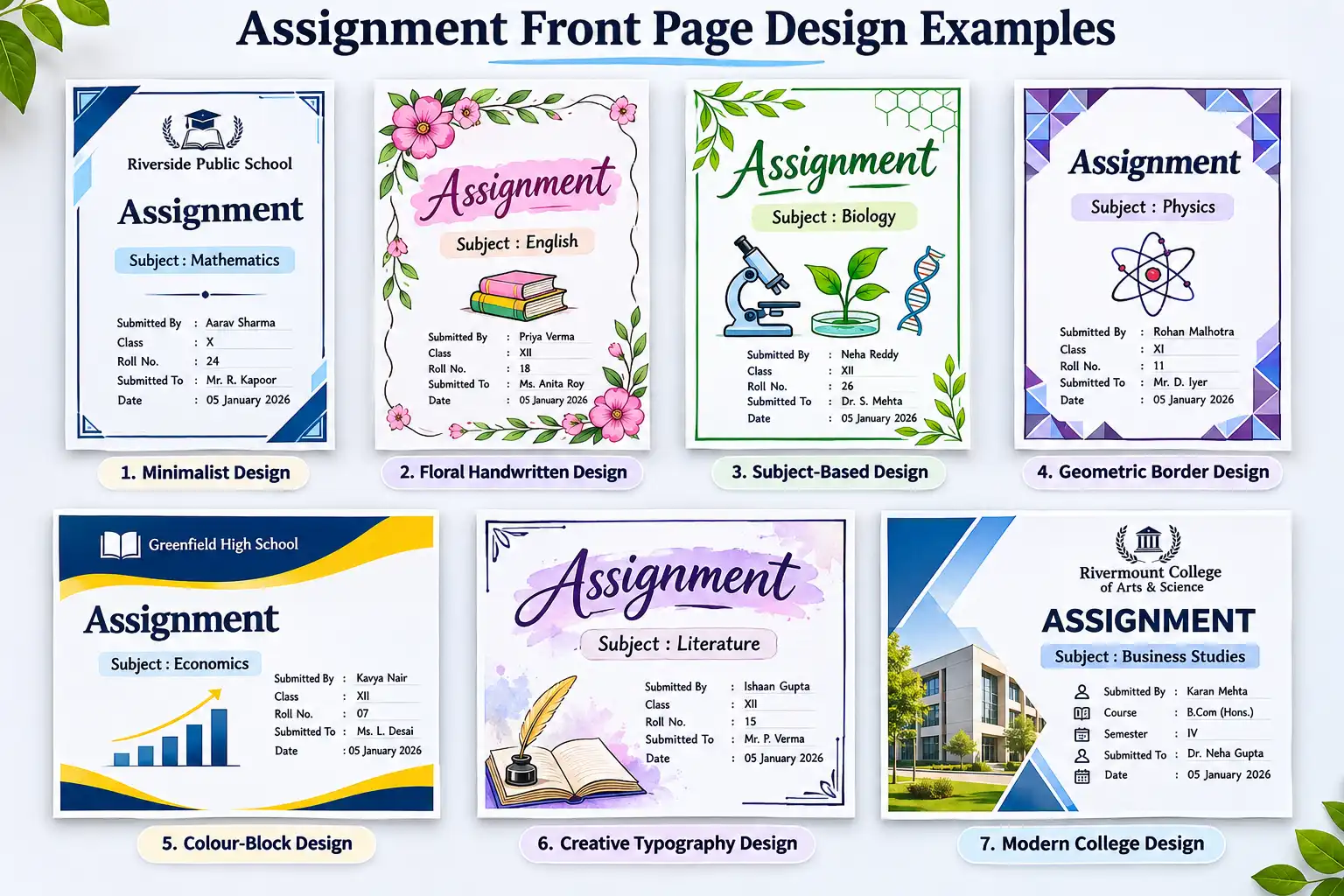
7 Assignment Front Page Design Ideas for School and College
Different assignments call for different visual styles. A biology project may benefit from a botanical illustration, while a business report usually looks better with a minimal academic layout.
Here are seven approaches you can adapt to your own assignment.
1. Minimalist Assignment Front Page Design
A minimalist layout is a practical choice for students who prefer a clean and professional appearance.
The design uses a simple title, balanced spacing and limited decoration. Instead of filling the page with graphics, it gives the important information enough room to stand out.
How to arrange the page:
- Place the institution name at the top.
- Position the assignment title around the centre.
- Add the subject below the title.
- Arrange student and teacher details towards the bottom.
- Use a thin border or a small logo if necessary.
Suggested colours: Navy blue, white and light grey.
Suggested typography: A bold heading with a readable font for the remaining details.
This design works particularly well for college assignments, business studies, research papers and formal submissions.
2. Floral Handwritten Assignment Front Page
Floral borders are popular among students who enjoy decorating handwritten assignments.
You can draw small flowers, leaves and curved stems around the page to create a decorative frame. The central area should remain open for the assignment title and student information.
A useful technique is to draw larger flowers in two opposite corners and use smaller leaves along the remaining edges. This creates a balanced appearance without covering too much writing space.
Materials you can use:
- Pencil and eraser.
- Ruler.
- Black fineliner.
- Coloured pencils or sketch pens.
- A brush pen for decorative headings.
Suggested colours: Pink, lavender, green and cream.
This style is suitable for English, literature, environmental studies and creative school projects.
3. Subject-Based Assignment Cover Design
One way to make an assignment cover more meaningful is to connect its decoration with the actual subject.
Instead of using the same border for every assignment, choose one illustration that communicates the topic.
| Subject | Suitable design elements |
|---|---|
| Mathematics | Equations, geometric shapes and numbers |
| Biology | Leaves, plant structures and cells |
| Physics | Magnets, circuits and light bulbs |
| Chemistry | Molecular structures and laboratory equipment |
| Geography | Maps, globes and compass illustrations |
| History | Historical buildings and timelines |
| Computer science | Circuit patterns and coding symbols |
| English | Books, pens and creative lettering |
| Economics | Graphs, charts and financial symbols |
For example, a biology assignment about plant life could use a small botanical illustration in the lower corner. A mathematics assignment could use a geometric border.
The illustration should be related to the assignment topic rather than simply added for decoration.
4. Geometric Border Assignment Design
Geometric borders are a good alternative to traditional floral patterns.
You can create a repeating pattern using squares, circles, triangles and parallel lines. The shapes provide structure while keeping the middle of the page available for the title.
For a simple design, draw two rectangular borders around the page and place a small geometric pattern in each corner.
Design recommendations:
- Use consistent shapes and spacing.
- Avoid mixing too many patterns.
- Keep the central area uncluttered.
- Use one primary colour with a neutral shade.
Suggested colours: Dark blue and light blue, black and grey, or green and cream.
This approach is particularly suitable for mathematics, physics, engineering and computer science assignments.
5. Colour-Block Assignment Cover
A colour-block design divides the page into separate areas using solid backgrounds.
For example, you could use a dark blue header for the college name, a white middle section for the assignment title and a light grey panel for student information.
The result looks modern without requiring complicated illustrations.
A useful arrangement is:
- Top section: Institution name and logo.
- Middle section: Assignment title and subject.
- Lower section: Student and submission details.
Two or three complementary colours are usually sufficient. Make sure the text contrasts clearly with its background.
This style is especially useful for digital assignment covers created in Word or PowerPoint.
6. Creative Typography Assignment Cover
A typography-based design uses lettering as the main decorative element.
Instead of drawing flowers or geometric patterns, make the assignment title the visual focus.
For instance, a literature assignment could use a large title with a small book illustration. A history assignment could use a traditional serif font with a simple decorative line.
You can combine:
- A large title.
- A smaller subject heading.
- A thin dividing line.
- A simple border.
- Consistent student details.
Do not use decorative fonts for every line. The institution name, student details and submission information should remain easy to read.
This design works well for English, arts, literature and creative writing assignments.
7. Modern College Assignment Front Page
A modern college layout is suitable for students who want something more structured than a traditional handwritten cover.
It uses clear sections, aligned text and subtle graphic elements.
Try dividing the page into two areas. Place the assignment title and subject on the left, then arrange student information and submission details on the right.
For a printed assignment, use a white background with a single coloured accent. For digital submissions, a slightly shaded information panel can help separate the sections.
Suggested colours: Navy blue, charcoal and white.
Best suited for: College reports, management assignments, university projects and technical submissions.
Three Ready-to-Use Assignment Front Page Layouts
Choosing a design is only half the work. You also need to decide where each piece of information should appear.
The following three blueprints provide starting points that can be recreated by hand or digitally.
Layout 1: School Assignment Front Page
A school assignment usually benefits from a simple arrangement with room for decoration.
| Page position | Information |
|---|---|
| Top | School name and logo |
| Upper centre | ASSIGNMENT |
| Centre | Subject and assignment topic |
| Lower centre | Submitted by and student name |
| Bottom | Class, section, roll number and teacher’s name |
| Footer | Submission date |
Add a subject-related drawing or a simple decorative border. Keep the student’s details together so that the teacher can identify them easily.
Layout 2: Formal College Assignment Cover
College assignments often require more academic information.
| Page position | Information |
|---|---|
| Top | University or college name |
| Below | Department name and logo |
| Centre | Assignment title |
| Below title | Subject and course code |
| Lower section | Student name and ID |
| Bottom | Semester, professor’s name and submission date |
Use a professional font, limited colours and a clear information hierarchy.
For assignments that follow a specific academic style, such as APA, use the required title-page arrangement rather than applying a decorative college template.
Layout 3: Digital Assignment Cover
A digital assignment front page can use a split layout.
Header section: Institution name and logo.
Main section: Assignment title, subject and a small relevant illustration.
Information section: Student name, roll number, course and semester.
Footer section: Professor’s name and submission date.
This arrangement is easy to build with text boxes and shapes. It also works well when you need to reuse the same design for several assignments.
How to Create an Assignment Front Page in Microsoft Word
You do not need a separate design application to create a neat digital cover page. Microsoft Word provides several useful formatting features.
Step 1: Set the Page Size
Open a blank Word document and select the page size required by your institution.
A4 paper measures 210 × 297 mm and is commonly used for printed assignments.
A practical starting point is to leave approximately 15–20 mm around the edges, adjusting the margins to suit the printer and institutional requirements.
Step 2: Add the Institution Name
Place the institution name at the top of the page.
Use a readable font and make it visually distinct from the remaining text. Add the official logo only when permitted.
Step 3: Insert the Assignment Title
Place the assignment title in the main section of the page.
As a design suggestion, a heading of around 24–32 pt works well on many A4 covers. Longer titles may need a smaller size or an additional line.
Step 4: Add Student Information
Use separate lines or a simple table to arrange the student name, roll number, subject, class and professor’s name.
Align the information consistently instead of placing every item in a different position.
Step 5: Add a Page Border
In the desktop version of Word, open Design → Page Borders to select a border style, colour and width.
Keep the border away from important text. Microsoft also explains how to adjust the border’s position and apply it to a particular section in its page border instructions.
Step 6: Review and Export
Check the spelling, alignment and spacing. Save the document and export it as a PDF when required.
Open the exported PDF before submitting it. This helps identify missing graphics, unexpected line breaks or content that has moved during conversion.
Word also provides ready-made cover page templates through Insert → Cover Page. You can select a design and replace the sample text with your own information. See Microsoft’s cover page instructions.
How to Make a Handwritten Assignment Front Page
Handwritten designs do not need advanced drawing skills. A little planning can make a significant difference.
Start by lightly sketching the main sections with a pencil. Decide where the institution name, assignment title and student information will go before adding decorations.
Follow these practical suggestions:
- Use a ruler to create straight borders.
- Choose one lettering style for the main heading.
- Keep decorative illustrations near the corners.
- Leave enough space between information fields.
- Use colours consistently.
- Check spelling before writing with permanent ink.
- Erase unnecessary pencil marks after the ink has dried.
If you are creating several assignment covers, keep a consistent layout and change only the subject-related illustration or colour scheme. This makes the covers look coordinated without making them identical.
Common Assignment Front Page Design Mistakes
A creative design can still look untidy when the basic details are overlooked.
Using too many colours: Multiple bright colours can make the page difficult to read. Choose a small palette and use it consistently.
Overcrowding the page: Large illustrations and decorative borders should not compete with the assignment title.
Choosing decorative fonts for everything: Use creative lettering for the heading and ordinary fonts for student information.
Incorrect academic details: Double-check names, roll numbers, course information and submission dates.
Ignoring institutional instructions: A prescribed assignment format takes priority over personal design preferences.
Forgetting print margins: Important information placed too close to the page edge may not print properly on every printer.
Using low-quality images: A blurry logo or stretched illustration can make a digital cover look unfinished.
Final Checklist Before Submitting Your Assignment
Before printing or uploading your assignment, check each of these details:
-
Institution name and logo are correct.
-
Assignment title and subject are included.
-
Student name and roll number are accurate.
-
Class, course or semester is mentioned.
-
Teacher or professor’s name is correct.
-
Submission date is included.
-
The design follows the institution’s instructions.
-
Text and illustrations are easy to read.
-
Important details are not too close to the edges.
-
The final PDF or printed page has been reviewed.
Frequently Asked Questions
1. Which assignment front page design is best for school students?
A colourful handwritten design with a simple border and a subject-related illustration is a good choice for many school assignments. Keep the title and student details clearly visible.
2. What is the best assignment front page design for college?
A minimalist or modern academic layout is suitable for most college assignments. It should include the university name, department, assignment title, subject, student details and submission date.
3. How do I make a simple assignment front page?
Divide the page into three sections. Put the institution name at the top, the assignment title in the middle and student information towards the bottom. Add a simple border if permitted.
4. Which paper size should I use for an assignment cover page?
A4 portrait is a common choice for printed assignments. However, follow the paper-size instructions provided by your school or college.
5. Can I make an assignment cover page in Canva?
Yes. Canva provides design tools for creating digital covers with text, shapes, graphics and illustrations. Set up the required page dimensions, arrange the academic information and export the finished design in the format requested by your institution.
6. Should I use a handwritten or digital assignment front page?
Both options can work well. Handwritten designs offer more flexibility for personal decoration, while digital covers make it easier to align information, correct mistakes and maintain a consistent layout.
7. Is a logo compulsory on an assignment front page?
Not always. Some institutions require an official logo, while others do not. Check your assignment instructions before adding one.
Conclusion
An effective assignment front page is a combination of clear information, thoughtful spacing and a design that suits the subject.
You do not need complicated artwork or expensive software to create one. A simple border, a well-positioned title and properly organised academic details can make the page look complete.
Choose a design you can recreate comfortably, follow your institution’s formatting requirements and review the final page before submitting it.
Ultimately, the best assignment front page is not necessarily the most decorative one. It is the one that introduces your work clearly and presents it in an organised, professional way.