Five Tips for a Creative Resume
Looking for a new job? Then it’s time for a fresh CV. You don’t have to be a designer or an artist to make something that stands out. With these creative resume tips, your resume will catch the eye, without losing the information employers are looking for.
Table of Content
1. Think outside the box
What is a resume? Most people would say: a chronological summary of your work experience and education, with your contact details at the top, in a Word document. That kind of traditional CV won’t hurt you. But it won’t make you stand out either.
So first of all, let go of what you think a resume should look like and what should be on it. That depends entirely on who you are, what you can do, and who your CV needs to impress. A creative agency expects something very different from a bank.




2. Experiment with the shape
A colour, a different font or a different layout can make a big difference in how the information, and therefore you, comes across to the reader.
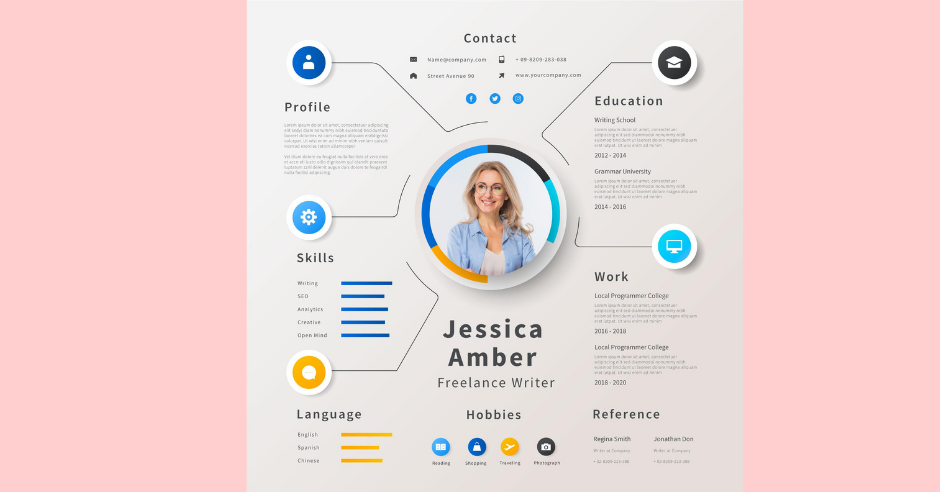
Anyone can format a Word file. So think about a different way to present your CV. Free tools like Canva, Google Docs templates or the design features in Word and PowerPoint make it easy to create something that looks professional.
Want to be really creative? Match the format to the job you’re applying for. Applying for a job in the hospitality industry? Format your resume like a menu. Are you a web designer? Present your resume on your own website and show what you can do. A video CV or an online portfolio can also work well for creative roles.
One important warning: many companies use an applicant tracking system (ATS) to scan resumes before a person ever sees them. Fancy layouts with columns, text in images or unusual fonts can confuse that software. Always keep a simple, text-based version of your CV as well, and send the creative one where it’s appreciated or link to it.
3. Decide which content you need (and which you don’t)
Of course, a resume isn’t a resume without work experience and education. But if you’re just starting out, you probably don’t have much relevant work experience yet. Filling that gap with every part-time job you’ve ever had won’t add much.
That “empty” space gives you room for other things. Describe what you learned during your studies and how it can help in this job. Add projects, volunteer work or a portfolio. Write a short personal profile about where you want to go in your career. And remove anything that doesn’t support the job you’re applying for.
4. Pay attention to readability
However impressive the design, always make sure the information is easy to understand. A hard-to-read resume simply won’t be read. Recruiters often spend less than a minute on a first scan. So when you use bright colours or different fonts, make sure the text stays readable. Using a presentation or video? Don’t overdo it with animations and effects. You want to convince people of your skills, not make them dizzy with a spinning slide.
Also think about the reader’s screen: many resumes are opened on a phone. Save it as a PDF, so the layout stays the same everywhere.
5. Go for a personal touch
Whether you just add a background colour or turn your resume into a complete work of art, what you present has to suit you. Describe things in your own words. A photo puts a face to the story, but you don’t have to add one if you’re uncomfortable with it; in some countries, it’s even common to leave it out.
Many employers use a resume parser to sort applications, but in the end, a person decides who gets invited. Your resume, together with your cover letter, should make that person curious enough to want to meet you. So present yourself and your real achievements, not the person you think they want to see.
What belongs on every resume?
Creative or not, a good resume always contains these basics:
- Contact details: your name, phone number, email address, city and a link to your LinkedIn profile or portfolio. A full home address is no longer necessary.
- Personal profile: three to five sentences about who you are, what you’re good at and what you’re looking for.
- Work experience: job title, company, dates and, most importantly, what you achieved. Start with your most recent job.
- Education: your degrees, diplomas and relevant courses, with dates.
- Skills: both hard skills (like software, languages and certifications) and soft skills (like teamwork or leadership), preferably with examples.
- Extra sections (optional): projects, volunteer work, awards, publications or hobbies that say something about you.
How to write a strong personal profile
The personal profile is often the first thing a recruiter reads, so make it count. Avoid empty words like “hard-working”, “motivated” and “team player” that everyone uses. Show instead of tell. Compare these two examples:
Weak: “I am a motivated and creative marketer who likes working in a team.”
Strong: “Marketer with four years of experience in social media and content for fashion brands. Grew the Instagram account of my current employer from 8,000 to 45,000 followers in two years. Looking for a role where I can combine creativity with data.”
The second version is specific, uses numbers and immediately tells the reader what you can do for them.
Describe results, not tasks
Many resumes list only tasks: “responsible for social media”, “managed customer service”. That says what you were supposed to do, not how well you did it. Try to describe your work in terms of results:
- Instead of “responsible for the webshop”, write “increased webshop sales by 30% in one year by improving product pages and checkout”.
- Instead of “handled customer complaints”, write “reduced the average response time to customer emails from two days to four hours”.
No exact numbers? Estimates are fine, as long as they’re honest.
Useful tools for a creative resume
- Canva: lots of free, modern resume templates that you can easily adjust.
- Google Docs and Microsoft Word: both have decent templates and make it easy to export to PDF.
- Adobe Express or InDesign: for designers who want full control over the layout.
- Your own website: platforms like WordPress, Wix or Squarespace make it easy to create an online resume and portfolio.
- LinkedIn: make sure your profile matches your resume. Many recruiters check both.
Creative resume ideas by profession
Need some inspiration? These ideas show how you can match your resume to your field:
- Graphic designer: use your resume as a showcase of your design skills, with your own visual identity, a clear grid and a link to your portfolio.
- Marketer: present your resume like a campaign, with your “key results” in numbers: growth percentages, leads generated, budgets managed.
- Developer: share a link to your GitHub profile or a personal website you built yourself. Some developers even format their resume like a piece of code.
- Photographer or videographer: a short video introduction or a visual one-pager with your best work says more than a long list of jobs.
- Teacher or trainer: structure your resume like a lesson plan, with “learning goals” for the school or company you want to work for.
Working in a more traditional field, like law, finance or healthcare? Then keep it subtle: a clean layout, one accent colour and a strong personal profile are often creative enough.
Pick a colour scheme and fonts that work
Colour and typography are the easiest ways to make your resume look creative without making it hard to read. Some guidelines:
- Use one or two accent colours. Use them for headings, lines or icons, and keep the body text dark grey or black on a white or light background.
- Think about what colours say. Blue feels reliable and calm, green fresh and balanced, red energetic and bold, and black or dark grey elegant and modern. Choose a colour that suits you and the company.
- Limit yourself to two fonts. One for headings and one for the body text. Clean fonts like Calibri, Lato, Open Sans, Roboto or Georgia are easy to read on screen and on paper.
- Keep the font size readable. Body text between 10 and 12 points, headings a few sizes larger.
- Use white space. A resume with room to breathe looks more professional than a page packed with text from edge to edge.
Tip: print your resume in black and white once. If it’s still easy to read, you’ve chosen your colours well.
Don’t forget your cover letter
A creative resume is even stronger when your cover letter matches it. Use the same colours, fonts and header, so the two documents look like a set. In the letter itself, keep it personal and specific: explain why you want to work for this company, and give one or two examples of what you’ve achieved that are relevant to the job. Keep it to one page. A recruiter who enjoyed your resume will be happy to read a short, well-written letter, but not three pages of general text.
Common mistakes with creative resumes
- Style over substance. A beautiful design can’t hide a lack of content. Make sure your experience and results are clear.
- Too long. For most jobs, one or two pages is enough. Recruiters don’t have time for more.
- Spelling and grammar mistakes. These stand out even more in a creative resume. Let someone else read it before you send it.
- Missing basics. Don’t forget your contact details, a link to your LinkedIn profile and the dates of your jobs and education.
- One resume for every application. Adjust your resume to each job. Use words from the job ad, and put the most relevant experience at the top.
- Unclear file names. “resume_final_v3.pdf” doesn’t help anyone. Use something like “FirstName-LastName-Resume.pdf”.
Free Creative Resume
Want to know more about writing a strong resume? Read a good CV in five steps.
Frequently asked questions about creative resumes
Is a creative resume a good idea?
For creative jobs, like design, marketing, media and advertising, a creative resume can help you stand out. For more traditional fields, a clean and professional layout with a small creative touch usually works better. Always think about who will read it.
Do creative resumes work with applicant tracking systems?
Not always. Columns, graphics, text in images and unusual fonts can confuse ATS software. That’s why it’s smart to have two versions: a simple text-based resume for online application systems and a creative version to send directly or share as a link.
How long should a resume be?
For most people, one page is enough, especially at the start of your career. With more than ten years of relevant experience, two pages is fine. Longer is rarely necessary.
Should I add a photo to my resume?
That depends on the country and the industry. In some countries, a photo is common; in others, like the US and the UK, it’s usually left out to avoid bias. If you add one, use a professional, friendly photo.
Which file format should I use?
PDF, unless the employer asks for something else. A PDF keeps your layout the same on every device. Some online application systems prefer Word files; check the instructions in the job ad.
Can I use a template for a creative resume?
Yes, templates are a great starting point. But adjust the colours, fonts and layout so it doesn’t look exactly like hundreds of other resumes made with the same template.
How often should I update my resume?
Update it every few months, or whenever you finish a big project, learn a new skill or change roles. That way, you’re always ready when an interesting job comes along.
Should I include hobbies on my resume?
Only if they add something. A hobby that shows a relevant skill, like running a blog for a marketing job or coaching a youth football team for a leadership role, can make you more memorable. A list like “reading, travelling, music” usually adds nothing and can be left out.
What if I have a gap in my resume?
Gaps are more common than you think, and most employers understand them. Be honest and keep it short: mention what you did in that period, such as caring for family, travelling, studying or recovering from illness, and focus on what you learned or how you’re ready to start again.
Can a creative resume replace a portfolio?
Not completely. A creative resume shows your style and summarises your experience, but for design, photography, writing or development jobs, employers also want to see your actual work. Add a link to your portfolio in your resume, so they can easily find it.