What Is a Website Audit? A Complete Guide to SEO, Performance, and Security

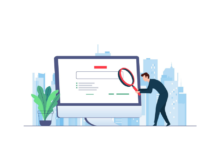
If you want to improve your website’s visibility, performance, and user experience, start with a website audit. An audit helps you identify technical errors, discover SEO opportunities, evaluate content quality, and understand what may be preventing visitors from finding or using your website effectively.
Think of a website audit like a health check for your online presence. Just as a mechanic inspects a car before recommending repairs, a website audit examines the different parts of your site before you decide what needs improvement.
A comprehensive website audit goes beyond checking keyword rankings. It examines technical SEO, website architecture, content quality, backlinks, page speed, security, accessibility, and user experience. The findings help you prioritize improvements based on their potential impact on your business.
In this guide, you’ll learn what a website audit involves, which areas to examine, what tools can help, and how to turn your findings into an actionable improvement plan.


Table of Content
What Is a Website Audit?
A website audit is a systematic examination of a website to identify technical problems, SEO weaknesses, performance issues, usability concerns, and opportunities for improvement.
The scope depends on your goals. An SEO audit focuses on search engine visibility, while a broader website audit may also evaluate security, accessibility, conversion paths, and overall site performance.
For example, an audit might reveal that important pages are not indexed, several articles compete for similar search terms, images slow down page loading, or visitors struggle to find important information.
Identifying these issues is only the first step. A useful audit explains why each issue matters, which pages are affected, and what action should be taken.
Why Is a Website Audit Important?
Websites change continuously as new pages are published, software is updated, links are added, and designs evolve. These changes can introduce problems that are difficult to spot without regular reviews.
A website audit helps you:
- Identify technical SEO problems: Find crawling issues, broken links, redirect errors, and incorrect canonical tags.
- Improve search visibility: Review titles, headings, content relevance, internal links, and indexability.
- Improve website performance: Identify large images, unnecessary scripts, and other potential causes of slow loading.
- Enhance user experience: Make navigation clearer and help visitors find information or complete tasks.
- Strengthen website security: Review HTTPS configuration, software updates, access controls, and other security measures.
- Discover content opportunities: Identify outdated pages, missing topics, overlapping articles, and information gaps.
- Improve conversions: Find obstacles that prevent visitors from contacting your business, subscribing, or purchasing.
An audit does not guarantee higher rankings or more traffic. Its purpose is to identify issues and opportunities so you can make better-informed decisions.
Types of Website Audits
Different audits examine different aspects of a website. You may need one type or a combination, depending on your goals.
1. Technical SEO Audit
A technical SEO audit examines whether search engines can discover, crawl, render, and index your important pages.
It typically covers:
- Robots.txt configuration and XML sitemaps.
- HTTP status codes and redirect chains.
- Canonical tags and duplicate URLs.
- Indexing and crawlability problems.
- Internal linking and site architecture.
- Mobile usability and page experience.
- Structured data implementation.
A technical audit is especially useful when organic traffic declines unexpectedly, a website migration causes problems, or important pages fail to appear in search results.
2. On-Page SEO Audit
An on-page SEO audit evaluates the elements of individual pages that help search engines and readers understand their content.
Important checks include page titles, meta descriptions, headings, content relevance, image alt text, internal links, and alignment with search intent.
The objective is not to insert as many keywords as possible. It is to make each page useful, understandable, and relevant to the queries it aims to address.
Learn more in our guide to on-page SEO.
3. Off-Page SEO Audit
An off-page SEO audit examines signals and activities outside your website that may influence your visibility and reputation.
This includes reviewing backlinks, referring domains, relevant brand mentions, and the quality of websites linking to your content.
Look for links that are relevant and editorially earned. Avoid relying on spammy link-building schemes or purchasing links intended to manipulate search rankings.
A useful audit can help identify legitimate outreach opportunities and understand how your backlink profile compares with competitors.
For more information, explore our guide to building an effective link-building strategy.
4. Website Performance Audit
A performance audit examines how quickly and reliably your pages load and respond to user interactions.
It may evaluate image sizes, JavaScript execution, CSS delivery, caching, server response times, and Core Web Vitals.
Performance issues can affect usability, especially on mobile devices or slower connections. However, improving a speed score alone does not guarantee higher rankings or conversions.
5. User Experience and Accessibility Audit
A usability audit examines how easily visitors can navigate your website, understand its content, and complete important tasks.
An accessibility audit evaluates whether people with different abilities can use the site, including those who rely on keyboards, screen readers, or other assistive technologies.
Common checks include:
- Clear navigation and page structure.
- Readable text and sufficient color contrast.
- Descriptive links and form labels.
- Keyboard accessibility.
- Alternative text for meaningful images.
- Clear error messages and helpful form instructions.
- Responsive layouts on different screen sizes.
Improving usability and accessibility can make your website easier to use for a wider audience.
6. Website Security Audit
A security audit examines whether your website is configured and maintained to reduce security risks.
Depending on your website, it may include reviewing HTTPS, software updates, administrator permissions, authentication, backups, exposed services, and security headers.
HTTPS helps protect data in transit, but an SSL/TLS certificate alone does not make a website completely secure. Security requires ongoing maintenance and appropriate safeguards.
7. Content Audit
A content audit evaluates the usefulness, accuracy, relevance, and performance of your existing pages.
It can reveal outdated information, duplicate or overlapping articles, weak internal links, missing subtopics, and pages that no longer meet search intent.
Content decisions should be based on evidence. A page with low traffic is not automatically worthless, and deleting it may remove useful information or relevant backlinks.
Depending on the findings, you may update, consolidate, redirect, improve, or retain the content.
Website Audit Checklist: What Should You Check?
A structured checklist makes the audit easier to complete and helps you avoid overlooking important areas.
1. Check Accessibility, Crawlability, and Technical Errors
Start by confirming that users and search engines can access your important pages.
Review:
- HTTP and HTTPS versions of your URLs.
- Broken internal and external links.
- Pages returning unexpected 404 or server errors.
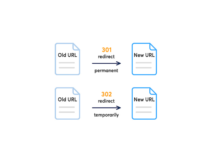
- Redirect loops and unnecessary redirect chains.
- Robots.txt rules that block important resources.
- XML sitemap accuracy.
- Canonical tags and duplicate URL variations.
- Important pages that are unintentionally marked
noindex.
HTTPS should be the preferred version of your website, with appropriate redirects from HTTP. Canonical tags should identify the preferred URL when duplicate or substantially similar pages exist.
Use Google Search Console to examine indexing information and search performance. A crawler such as Screaming Frog can help identify broken links, redirect chains, missing metadata, and other technical issues.
Remember that not every 404 error is a problem. Removed pages may correctly return 404 or 410 responses when there is no suitable replacement.
2. Review Website Architecture and Internal Linking
Website architecture describes how pages are organized and how visitors and search engines move between them.
A clear structure makes important content easier to discover and helps visitors understand the relationship between different topics.
During the audit, check whether:
- Important pages are accessible through relevant navigation or internal links.
- Categories and subcategories have a logical structure.
- URLs are readable and consistent.
- Related articles link to one another where useful.
- Orphan pages exist without meaningful internal links.
- Breadcrumbs help users understand where they are on the site.
Internal links also help search engines discover pages and understand their relationships. Relevant links can direct visitors from introductory content to detailed guides, product pages, or useful resources.
Avoid adding links simply to increase their number. Each link should help readers navigate or understand the topic.
3. Audit On-Page SEO Elements
Review the key elements of your most important pages.
Page titles: Write descriptive titles that accurately represent the page. Include the primary topic naturally, but avoid repetitive keyword stuffing.
Meta descriptions: Provide a concise and useful summary that gives searchers a reason to consider the page. Google may generate a different snippet depending on the query.
Headings: Organize content with a clear H1 and logical H2 and H3 headings. Use headings to improve comprehension rather than forcing keywords into every section.
Content relevance: Make sure the page answers the questions and fulfills the needs of its intended audience.
Images: Use descriptive filenames where appropriate, relevant alt text for meaningful images, and suitable image dimensions.
Internal links: Link to related pages with descriptive anchor text that makes sense in context.
Structured data: Validate relevant structured data and confirm that it accurately reflects the visible content.
Do not rely on a fixed keyword density or a rigid character count as a guarantee of SEO success. Prioritize clarity, relevance, and usefulness.
4. Evaluate Content Quality and Search Intent
A page may be technically accessible but still perform poorly because it does not answer the reader’s question well.
Review your important content to determine whether it:
- Addresses the main search intent.
- Provides accurate and sufficiently detailed information.
- Uses clear language and useful examples.
- Covers the important subtopics readers expect.
- Offers original insights or practical guidance.
- Includes current information where the topic changes frequently.
- Links to trustworthy sources when appropriate.
Search intent matters because different queries require different types of content. Someone searching for a definition may want a concise explanation, while someone comparing software may need features, limitations, pricing, and alternatives.
Use Google Search Console data to identify queries and pages that deserve further investigation. Compare impressions, clicks, click-through rates, and average positions, while recognizing that these metrics can vary by query and search result layout.
Do not update an article solely to add more words. Make changes that improve its usefulness or accuracy.
5. Analyze Off-Page SEO and Backlinks
Backlinks can help search engines discover content and understand how other websites reference it. However, not every backlink provides the same value.
During a backlink audit, examine:
- Referring domains and the pages linking to you.
- Whether links come from relevant, legitimate websites.
- Lost backlinks that may be worth recovering.
- Unnatural link patterns that require investigation.
- Competitors’ relevant link sources.
- Opportunities to earn links through original resources or useful content.
You can use backlink analysis tools to investigate these patterns. If you discover potentially harmful links, review their context before taking action. A low-quality-looking link does not automatically require removal or disavowal.
Build your link acquisition strategy around useful content, legitimate relationships, and editorially appropriate references rather than automated link schemes.
6. Test Website Speed and Core Web Vitals
A slow website can make it harder for visitors to read, browse, or complete tasks.
Use Google PageSpeed Insights to review page performance and available field data. Where possible, test important page types, such as your homepage, articles, category pages, and product pages.
Pay attention to the Core Web Vitals metrics:
- Largest Contentful Paint (LCP): Measures how quickly the main content becomes visible. The good threshold is 2.5 seconds or less.
- Interaction to Next Paint (INP): Measures responsiveness to user interactions. The good threshold is 200 milliseconds or less.
- Cumulative Layout Shift (CLS): Measures unexpected visual movement. The good threshold is 0.1 or less.
These thresholds are generally assessed at the 75th percentile of real-user visits, with mobile and desktop evaluated separately.
Common performance improvements include:
- Compressing and resizing images appropriately.
- Using modern image formats when suitable.
- Loading below-the-fold images lazily.
- Avoiding lazy loading for the main image that needs to appear immediately.
- Reducing unnecessary JavaScript and third-party scripts.
- Improving caching and server response times.
- Specifying image dimensions to reduce layout shifts.
- Loading critical resources efficiently.
Avoid applying every optimization without testing. Preloading too many resources, for example, can compete with other important assets and make performance worse.
7. Check Website Security
Website security protects your visitors, your business, and your website’s data.
Start with the following checks:
- Confirm that HTTPS works correctly.
- Ensure that HTTP URLs redirect appropriately.
- Keep your CMS, plugins, themes, and server software updated.
- Remove unused plugins and unnecessary administrator accounts.
- Use strong authentication and appropriate access permissions.
- Maintain reliable backups and test recovery procedures.
- Review suspicious activity, spam submissions, and unexpected changes.
- Configure security headers and other protections where appropriate.
An SSL/TLS certificate encrypts data transmitted between a browser and your website. It does not protect against every vulnerability, such as insecure application code, compromised credentials, or outdated software.
For sites that process payments or sensitive information, security reviews should reflect the site’s actual risks and applicable requirements.
8. Review Competitor Websites
Competitor analysis helps you understand how other websites address the same audience and search topics.
Identify competitors that rank for the queries you want to target. Then examine their content, site structure, page formats, internal links, and relevant backlink sources.
Look for questions they answer that your content misses, as well as areas where their explanations are unclear, outdated, or incomplete.
Competitor analysis should help you discover opportunities, not encourage you to copy their content. Develop a stronger page by answering the user’s question more clearly, providing reliable evidence, and offering useful examples or original insights.
9. Evaluate Usability and Conversion Paths
A website should make it easy for visitors to accomplish their goals.
If your objective is to generate leads, users should be able to find contact information and submit a form without confusion. If your objective is ecommerce sales, product information, shipping details, and checkout options should be easy to locate.
Test your website on mobile and desktop devices. Check navigation, search, buttons, forms, and other important interactions.
Look for unnecessary steps, confusing labels, intrusive pop-ups, and content that makes the next action unclear.
Analytics can help identify where visitors leave a conversion path, while usability testing can help explain why. Avoid assuming that every exit or short session represents a problem; some visitors find the answer they need quickly.
Best Tools for Conducting a Website Audit
You do not need every available SEO tool to begin. Start with tools that answer your most important questions.
| Tool | Main purpose |
|---|---|
| Google Search Console | Search performance, indexing information, and certain technical reports |
| Google Analytics 4 | Website traffic, user interactions, and conversion analysis |
| Google PageSpeed Insights | Page performance and Core Web Vitals information |
| Screaming Frog SEO Spider | Crawling URLs, links, metadata, redirects, and technical elements |
| Google Rich Results Test | Testing supported structured data for rich-result eligibility |
| Bing Webmaster Tools | Search performance and website diagnostics for Bing |
| Backlink analysis tools | Reviewing referring domains, backlinks, and competitor link opportunities |
Some tools have usage limits or paid features. Start with the free tools that address your needs, then consider paid options if you require larger crawls, more detailed backlink data, or advanced reporting.
No single tool provides a complete website audit. Combine data from multiple sources and manually inspect important pages before deciding what to change.
How to Turn Your Website Audit Into an Action Plan
An audit is useful only when its findings lead to appropriate improvements. Once you have collected the data, organize issues into a prioritized action plan.
Step 1: Record the Findings
For every issue, record the affected URL or page group, the evidence, the potential impact, and the recommended fix.
For example, a group of important pages returning server errors needs a different response from a blog post missing an image alt attribute.
Step 2: Prioritize by Impact and Effort
Consider how many pages are affected, how important those pages are, whether the problem prevents users or search engines from accessing content, and how difficult the fix will be.
A practical priority system might look like this:
- High priority: Important pages are blocked from indexing, the website has a serious security issue, or key functionality is broken.
- Medium priority: Internal linking, performance, or content issues affect important pages and require investigation.
- Lower priority: Minor editorial inconsistencies or improvements with limited impact on user experience.
The exact priority depends on your website and business objectives.
Step 3: Implement Changes Carefully
Fix the highest-priority issues first. When changes affect redirects, canonical tags, robots directives, or website architecture, test them carefully to avoid creating new problems.
For major changes, record the original state and validate the results after implementation.
Step 4: Measure the Results
After making changes, monitor the relevant metrics.
Depending on the fix, this could include indexing status, search clicks, impressions, Core Web Vitals, conversion rates, or the number of broken links.
Allow enough time for search engines and analytics data to reflect the changes. A performance improvement may be measurable quickly, while the organic search impact of content or architecture changes may take longer and is not guaranteed.
Step 5: Schedule Regular Audits
A website audit should not be treated as a one-time task. Review important technical checks regularly and conduct a broader audit after major redesigns, migrations, significant traffic changes, or large publishing projects.
The right schedule depends on the size and complexity of your site. Automated monitoring can help detect recurring issues between comprehensive reviews.
Frequently Asked Questions
What does a website audit include?
A website audit can include technical SEO, on-page optimization, content quality, backlink analysis, website performance, security, accessibility, usability, and conversion paths. The exact scope depends on the website’s objectives.
How often should you conduct a website audit?
Conduct a broader audit periodically and whenever major changes occur, such as a website migration, redesign, or unexpected decline in performance. Monitor important technical and security issues more frequently.
Can a website audit improve Google rankings?
A website audit can identify issues that may be limiting search visibility and help you prioritize improvements. However, an audit itself does not improve rankings; the impact depends on the changes made, competition, content quality, and other factors.
What is the difference between a website audit and an SEO audit?
A website audit can examine the entire online experience, including security, accessibility, performance, and usability. An SEO audit focuses primarily on factors affecting search engine discovery, indexing, relevance, and organic visibility. Their scopes often overlap.
Which tools are best for a website audit?
Google Search Console, Google Analytics 4, PageSpeed Insights, and a website crawler are useful starting points. Additional tools may help with structured data, security, accessibility, or backlink analysis.
Can I perform a website audit myself?
Yes. You can use free tools to check many common issues, including indexing, page performance, broken links, and search traffic. More complex technical problems may require help from an experienced developer or SEO professional.
Conclusion
A website audit helps you understand what is working, what needs attention, and where improvements may have the greatest value. By reviewing technical SEO, website architecture, content, backlinks, performance, security, and user experience, you can create a clearer plan for improving your website.
Start with your most important pages and the problems that prevent visitors or search engines from accessing and understanding them. Use reliable tools to gather evidence, prioritize fixes according to their impact, and measure the results after implementation.
Most importantly, treat a website audit as an ongoing process. Regular reviews help you catch problems earlier, maintain a better user experience, and make more informed decisions about your website’s growth.