Black Friday SEO: How to Get Your Online Store Ready for More Sales
Black Friday is one of the busiest shopping periods of the year. Customers search for discounts, compare prices, and look for the best deals before making a purchase. For online stores, this creates an excellent opportunity to attract new customers and increase sales.
But there is a catch. Your competitors are preparing for the same rush, and getting your products in front of potential customers can be challenging.
A good Black Friday SEO strategy can help your online store appear in relevant search results and bring more shoppers to your website. The work starts well before the sale itself. From preparing your landing page to improving product listings, a few well-planned changes can make a difference.
Let’s look at how you can prepare your website for Black Friday and make the most of the shopping season.
Table of Content


1. Publish Your Black Friday Landing Page Early
The first error which e-commerce stores commit is leaving too little time to prepare the Black Friday landing page.
In order to process and index any website, search engines require certain time. By publishing your landing page two or three days before the sale, you are not guaranteed that it will be found by your clients through search engines.
By creating the page at least a week or two prior to the sale date, you will have enough time to work on its contents, create internal links and verify whether search engines can index it.
The landing page needs to provide users with necessary information concerning what they can expect from the sale.
This means listing the promoted products, kinds of discount and the time when people can expect them.
There is no need to write down all discounts you intend to offer in advance. Just put down as much useful information as possible about the forthcoming sale.
Check that Google can access your page
Publication of the page is just one of the requirements. There also needs to be assurance that the search engine can index it.
Check whether there is any accidental blocking of the page using the robots.txt file or the noindex instruction. Verify the canonical URL and whether the page is accessible through links on your site.
One way to accomplish this is to use Google Search Console. It allows you to examine the URL and determine its indexing status. The process of requesting indexing may assist Google in finding the updated page, although it does not ensure indexing.
For more information, see Google’s guide to e-commerce SEO.
2. Find the Right Black Friday Keywords
Keyword research allows you to understand customer search terms prior to and during Black Friday.
Focusing solely on the keyword “Black Friday” will not work for most online stores. Rather, you need to find search terms associated with your products and promotions.
For instance, a retailer of electronics should target Black Friday laptop deals, smartphone deals, video games, or headphones. A clothing brand can target Black Friday shoe sales, dress promotions, jacket offers, etc.
Those are some examples of keywords to use. The optimal search terms for your business will be different depending on the products and customers you have.
Begin your keyword research using tools like Google Search Console, Google Trends, and a keyword research tool. Check the search queries used by people visiting your website, and find related keywords that can be targeted during the promotion period.
Notice people’s intention when searching for something. “How to choose a laptop” implies that a person is looking for information, whereas “Black Friday laptop deals” implies comparison of offers.
Your promotional page should focus on shoppers looking for deals. Buying guides and other helpful articles can answer questions earlier in the buying process.
Once you’ve chosen your keywords, use them naturally in the page title, main heading, subheadings, and relevant sections of the content. Include related phrases where they make sense, but don’t force the same keyword into every paragraph.
The goal is to make the page useful for shoppers, not to repeat a phrase as many times as possible.
3. Keep the Same URL for Black Friday Every Year
Black Friday comes around every year, so there’s usually no need to create a completely new landing page URL for each sale.
For example, a URL such as /black-friday/ can be reused for future campaigns. Creating a separate URL such as /black-friday-2026/ every year may spread your content, links, and reporting across several pages that serve the same purpose.
With a consistent URL, you can update the page each year while continuing to use the same destination in your internal links and marketing campaigns.
Over time, the page may also earn backlinks and build a useful history of search performance. Keeping the URL allows you to maintain that destination, although rankings will still depend on the quality and relevance of the content and other SEO factors.
What should you do when the sale ends?
You don’t necessarily need to remove the page after Black Friday.
Instead, update it to explain that the current sale has ended. You can direct visitors to regular offers, popular products, or an email signup form for future promotions.
Before the next Black Friday, refresh the page with the latest dates, offers, and product information.
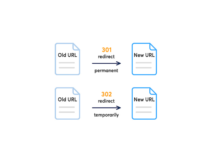
If your existing page already receives organic traffic or has earned backlinks, avoid changing its URL without a good reason. If a URL change is necessary, set up an appropriate permanent redirect and update the internal links pointing to it.
4. Add Internal Links to Your Black Friday Page
It shouldn’t be hard for people to find your landing page after they have landed on your site.
Internal linking will help them get around to other pages as well as give additional information to the search engine crawlers about how your site is structured.
Firstly, make sure you link to your landing page from different parts of your site. This includes linking from your homepage – a good idea for seasonal promotions. Your Black Friday landing page can also be linked from product categories, buying guides, as well as articles about particular products.
In this case, an electronics site can link to its Black Friday page from its laptop category. A fashion store, in turn, can link to a page with shoe offers from its footwear category.
Make sure that link text is descriptive and provides visitors with the clue about where it’s going to lead them. Links such as “Black Friday laptop offers” and “find out more about our Black Friday offers” are better than “click here” type of links.
Linking should be done with regard to relevance to the particular page, not every page on your site needs a Black Friday link.
It’s also worth reviewing your overall site structure to identify important pages that are difficult to reach. Our guide to website audits can help you explore this process.
5. Improve Your Product and Category Pages
Your Black Friday landing page may attract visitors, but many shoppers will also arrive directly on product pages or category pages.
That’s why it’s important to prepare your wider online store, not just the main promotional page.
Start with the products and categories that matter most to your business. Make sure the product titles are clear, descriptions provide useful information, and prices are accurate.
A good product description should help customers understand what they’re buying. Include relevant details such as specifications, sizes, materials, compatibility, or other features that influence purchasing decisions.
Avoid relying entirely on generic manufacturer descriptions when you can provide more useful information for your customers.
Keep product prices and availability accurate
Black Friday deals can shift fast. Ensure that whatever changes happen regarding products sold out or discounts expired are reflected in your website details.
No customer should be required to go all the way to checkout to realize that an advertised deal is no longer valid.
It would also be wise to look into the structured data in relation to your products to make sure that information like prices and stock status are in sync with what the page shows.
In the event that you operate with Google Merchant Center, your product feed must also be updated.
This will ensure consistency in product information.
6. Use Clear, High-Quality Product Images
Images may either encourage people to investigate a product or cause them to leave and shop at another place.
During Black Friday, consumers will often be looking at various products within a short amount of time. Quality images ensure that people know exactly what they are buying.
Use high-resolution images that depict your products clearly. Provide additional angles for pictures if necessary, and make sure that images will load well on mobile phones.
Image quality is crucial, but the size of images shouldn’t be overlooked either. Big image files may result in slow loading of web pages containing multiple product listings.
If it is possible to compress the image without damaging the quality, then this should be done.
The next step involves adding descriptive alt tags to relevant product pictures. For instance, you may describe an image showing wireless black headphones as “Black over-ear wireless headphones.”
Make sure to keep it relevant. Inserting numerous Black Friday keywords into image alt tags won’t be helpful for consumers using screen readers.
Finally, check for broken image links and make sure important product images can be accessed by search engines.
7. Make Sure Your Website Works Well on Mobile
Many consumers look for offers, compare products, or purchase anything using only their smartphone without ever landing on the desktop version of your website.
Your users may get frustrated from poor experience and abandon your site in favor of your competitors, even though your offer is really good.
Before Black Friday, pretend to be one of your customers. Visit your site, open any product, look at its features, add it to your cart, and go through the checkout process.
Keep an eye on such aspects as slow loading pages, bad navigation, hard-to-click buttons, and complex forms.
Make sure that the images of your products load fast and don’t change position while the page is still being loaded.
To do that, you can use tools like Google PageSpeed Insights or gather real-user data.
Prepare for a traffic spike
Your website may receive visitors from organic search, paid advertising, email campaigns, and social media at the same time.
Make sure your hosting, caching, inventory system, and checkout process can handle the expected demand.
Test important customer journeys before the sale begins. A landing page that attracts plenty of visitors won’t help much if the website becomes unavailable or customers can’t complete their purchases.
8. Promote Your Black Friday Page Through Other Channels
SEO is an important part of Black Friday marketing, but it doesn’t have to work alone.
Once your landing page is ready, use your other marketing channels to bring interested customers to it.
Email marketing: Send customers updates about upcoming offers and direct them to relevant products or categories.
Paid advertising: Use appropriate landing pages for your campaigns and make sure the advertised deals match what’s available on the website.
Social media: Share product highlights, sale announcements, and useful buying information that encourages interested shoppers to visit your store.
Content marketing: Publish buying guides and product comparisons that help customers make informed decisions before purchasing.
Remarketing: Where appropriate and permitted, use advertising campaigns to reconnect with previous website visitors.
Keep the messaging consistent across these channels. If an email promotes a particular discount, customers should be able to find that offer easily when they reach your website.
Your Black Friday page can serve as the main destination for your campaign, while links to specific categories and products help shoppers get straight to what interests them.
For more ideas, explore our guide to blog marketing.
9. Publish Helpful Content Before Black Friday
Not everyone who comes to look for something on the site knows exactly what they are looking for.
Someone requires assistance in comparing products, analyzing specifications or selecting a product that will be the most beneficial. This kind of content will not only help to answer these questions, but will make your potential customers acquainted with your products.
Thus, for instance, an electronics store could write articles on how to choose a laptop, compare monitor specifications or select a proper smartphone.
Similarly, a fashion website could provide the information on how to choose a footwear or clothes suitable for a certain occasion.
The articles should be related to your products and your clients’ interests. The creation of an article only due to the fact that it contains a Black Friday keyword is not very helpful.
Moreover, you should connect these articles to the corresponding product pages and categories where it is possible. A visitor who found a laptop buying guide helpful will definitely visit your laptop offers page.
Do not write the same thing in different articles.
If you want to improve the broader search performance of your website, our guide on how to make your website SEO-friendly is a useful place to start.
10. Measure Your Black Friday SEO Results
After putting in effort to create a Black Friday campaign, you want to know whether your efforts bore fruit.
It is important that you set up reporting ahead of the sale as you need something to compare to.
Google Search Console can help you evaluate how well your landing page performs in terms of organic search. Pay attention to the number of clicks, impressions, search queries, click-through rate, and average position.
It will be useful for you to analyze how visitors find your page and whether the searches are related to the products and offers that you provide.
Analytics tool can tell you about the visitor behavior after they get there. Depending on your set-up, you might be able to track organic sessions, products viewed, items added to cart, started checkouts, successful transactions, and sales revenue.
Do not rely solely on traffic.
The more visitors you have is always good, but this does not guarantee increased sales. If you see an increase in organic traffic and no growth in conversions, you should try to understand why.
Comparison with the previous Black Friday campaigns would also help. Consider what succeeded, what products caught the eye, and when people abandoned shopping for various reasons.
However, keep in mind that alterations in discount policies, available inventory, competitive environment, and demand may affect the outcome from year to year.
This will help you prepare for your next campaign better.
11. Avoid These Common Black Friday SEO Mistakes
Even a well-planned campaign can run into problems if important details are overlooked.
Here are a few mistakes worth avoiding.
Publishing the landing page too late: Give yourself time to prepare the page, check indexing, and build internal links before the sale begins.
Creating a new URL every year without a clear reason: A consistent URL makes it easier to maintain the same destination across campaigns.
Leaving expired offers unchanged: Update promotional information when deals end so visitors aren’t misled by outdated prices or unavailable products.
Ignoring internal links: Make sure shoppers can reach your Black Friday page from relevant sections of your website.
Repeating keywords excessively: Write for people first. Include relevant search terms naturally instead of forcing them into every heading and paragraph.
Ignoring mobile performance: Test your website on phones and tablets, especially the product pages and checkout process.
Failing to prepare for increased traffic: Review your hosting, inventory, and checkout systems before launching major campaigns.
Measuring only organic traffic: Look at conversions and revenue as well as search visibility to understand the campaign’s business impact.
Avoiding these problems won’t guarantee higher rankings or more sales, but it will help you build a more reliable shopping experience.
Black Friday SEO Checklist
Use this checklist to make sure your website is ready.
Before Black Friday
- Publish your landing page early.
- Research relevant Black Friday keywords.
- Keep your URL consistent where practical.
- Check that search engines can crawl the page.
- Review canonical tags and indexing status.
- Add internal links from relevant pages.
- Update product descriptions, prices, and availability.
- Optimize product images.
- Test mobile usability and website performance.
- Prepare supporting content and promotional campaigns.
- Set up analytics and conversion tracking.
During the Sale
- Check that offers and prices remain accurate.
- Monitor product availability.
- Test the checkout process.
- Watch for website performance issues.
- Review traffic, conversions, and sales.
- Update product information when necessary.
After Black Friday
- Update expired promotions.
- Keep the landing page useful for visitors.
- Direct customers to relevant current offers.
- Review search performance and sales data.
- Record lessons for the next campaign.
- Refresh the page before the next Black Friday.
Frequently Asked Questions
What is Black Friday SEO?
Black Friday SEO involves optimizing an online store’s landing pages, product pages, category pages, and supporting content to help shoppers discover relevant offers through search engines.
It includes keyword research, technical SEO, internal linking, product optimization, and website performance.
When should I publish my Black Friday landing page?
Publish it well before the sale so you have time to improve the content, check indexing, and add relevant internal links.
There is no guaranteed publishing date that ensures a page will rank. The amount of preparation needed depends on your website, competition, and the page itself.
Should I create a new Black Friday page every year?
In most cases, using a permanent URL is a practical option when the page serves the same purpose each year.
You can update the offers, dates, and product information without creating a separate URL for every campaign. If your existing page already performs well, avoid changing its URL without a good reason.
Should I remove my Black Friday page after the sale?
Not necessarily. You can keep the page live, explain that the current sale has ended, and direct visitors to other relevant offers.
Before the next Black Friday, update the page with the latest information.
Does linking to my Black Friday page from the homepage help SEO?
A homepage link can make the page easier for visitors to discover and help search engines understand your website’s structure.
However, it doesn’t guarantee higher rankings. The page should also provide relevant content, accurate offers, and a good shopping experience.
Can small online stores benefit from Black Friday SEO?
Yes. Smaller stores can focus on specific product categories, relevant search terms, and useful content that matches their customers’ needs.
Rather than trying to compete for every broad Black Friday keyword, concentrate on the products and offers that make sense for your business.
Final Thoughts
Black Friday is an important chance for e-commerce businesses, but preparing for it requires more than simply implementing some discounts on the homepage.
Prepare well in advance, develop a useful landing page, investigate the search queries of your clients, and get your product pages ready for the traffic. Develop proper internal links, test your mobile site, and monitor what happens next.
The most important thing is not to limit your Black Friday SEO efforts only to a week. Your preparations will be helpful in future marketing campaigns as well.
At OutreachWay, we help businesses improve their online visibility through practical SEO strategies. If you’re unsure where your website needs improvement, explore our website audit services to identify potential issues and opportunities.